Executive Summary
I documented a build and operations plan for a two-node Proxmox VE homelab on HP ProDesk Mini hardware with a lightweight Linux QDevice for quorum, a GNS3 network-simulation stack, a Windows/Active Directory laboratory, and a Kali workstation retained on a Windows Mini PC via VirtualBox. I defined roles, addressing, storage, and backup strategy: pve01 for GNS3 and Linux services, pve02 for Windows and identity, local per-node VM storage, and a portable 256 GB SSD for backups with clear separation of snapshot vs. backup use.
All activities are currently recorded as planned with success criteria stated per step: hardware inventory and VT-x/VT-d enablement, 32 GB RAM per node with memtest, matched Proxmox versions and static IP/DNS, cluster creation with a QDevice on 192.x.x.13, and backup configuration. No installations, validations, or results are recorded yet. This plan establishes a practical, low-cost lab blueprint with quorum-aware clustering and backup hygiene, ready for execution and later HA enhancement if required.
Objectives
My objective was to design and stand up a resilient two-node Proxmox VE cluster on HP ProDesk Mini systems, add a lightweight QDevice for quorum, provide a GNS3 network-simulation environment, build a Windows/Active Directory lab, and keep a Kali security workstation on a Windows Mini PC using VirtualBox for isolation.
I defined success criteria per planned stage: both nodes inventoried with virtualization enabled (Intel VT-x/VT-d); each node upgraded to 32 GB and passing a full memory test; two Proxmox nodes installed with matching versions, unique hostnames (pve01, pve02), and static management IPs (192.x.x.11 and 192.x.x.12) with correct DNS; a two-node cluster created with a Linux QDevice (corosync-qnetd) at 192.x.x.13 that supplies a third vote so the cluster remains quorate when either node is offline; and storage/backup setup with per-node local VM storage and a 256 GB external SSD used for backups, explicitly distinguishing snapshots from backups.
Scope
In scope, I planned a two-node Proxmox VE cluster on HP ProDesk Mini hardware, with pve01 hosting GNS3 Server and Linux guests, and pve02 hosting Windows Server, two Windows clients, and an Ubuntu Desktop for the identity lab. The Windows Mini PC retains the Kali workstation in VirtualBox and also hosts the Linux QDevice VM for quorum. Local storage remains per node; a 256 GB external SSD serves as the portable backup target for VM exports, configuration backups, and selected Proxmox backups. Snapshots are reserved for short-lived protection before risky changes and are not treated as backups.
Primary shared storage and fully automated HA recovery are not part of this plan; the QDevice provides quorum only and does not itself deliver HA. The lab is intended for hands-on practice while keeping intentionally vulnerable systems isolated from the home network.
Requirements
- Two HP ProDesk Mini nodes, each confirmed virtualization-capable with Intel VT-x/VT-d enabled in firmware, with documented model, CPU, RAM, storage, NIC, BIOS version, and rear ports, and photos of labels/ports for the build record.
- Memory upgrades to a matched 32 GB configuration per node, followed by a full memory test before any workload is placed on them; the Windows Mini PC retains 12 GB and hosts the Kali workstation, the QDevice, and the GNS3 client.
- Proxmox VE installation media for a current release, installed with matching versions on both nodes, unique hostnames (pve01, pve02), static management IPs 192.x.x.11 and 192.x.x.12 outside the DHCP pool, and correct DNS entries; HP BIOS/device firmware updated before production lab workloads are installed.
- Storage and backups: local VM storage per node and an external 256 GB SSD designated as a portable backup target; the backup medium is disconnected or protected when not receiving backups; snapshots are used tactically and not as backups.
- Clustering and quorum: a two-node cluster created on pve01 with pve02 joined; a lightweight Linux QDevice VM (~512 MB RAM) running corosync-qnetd at static IP 192.x.x.13 on the Windows Mini PC, configured to auto-start and carry no workloads or shared storage.
Environment
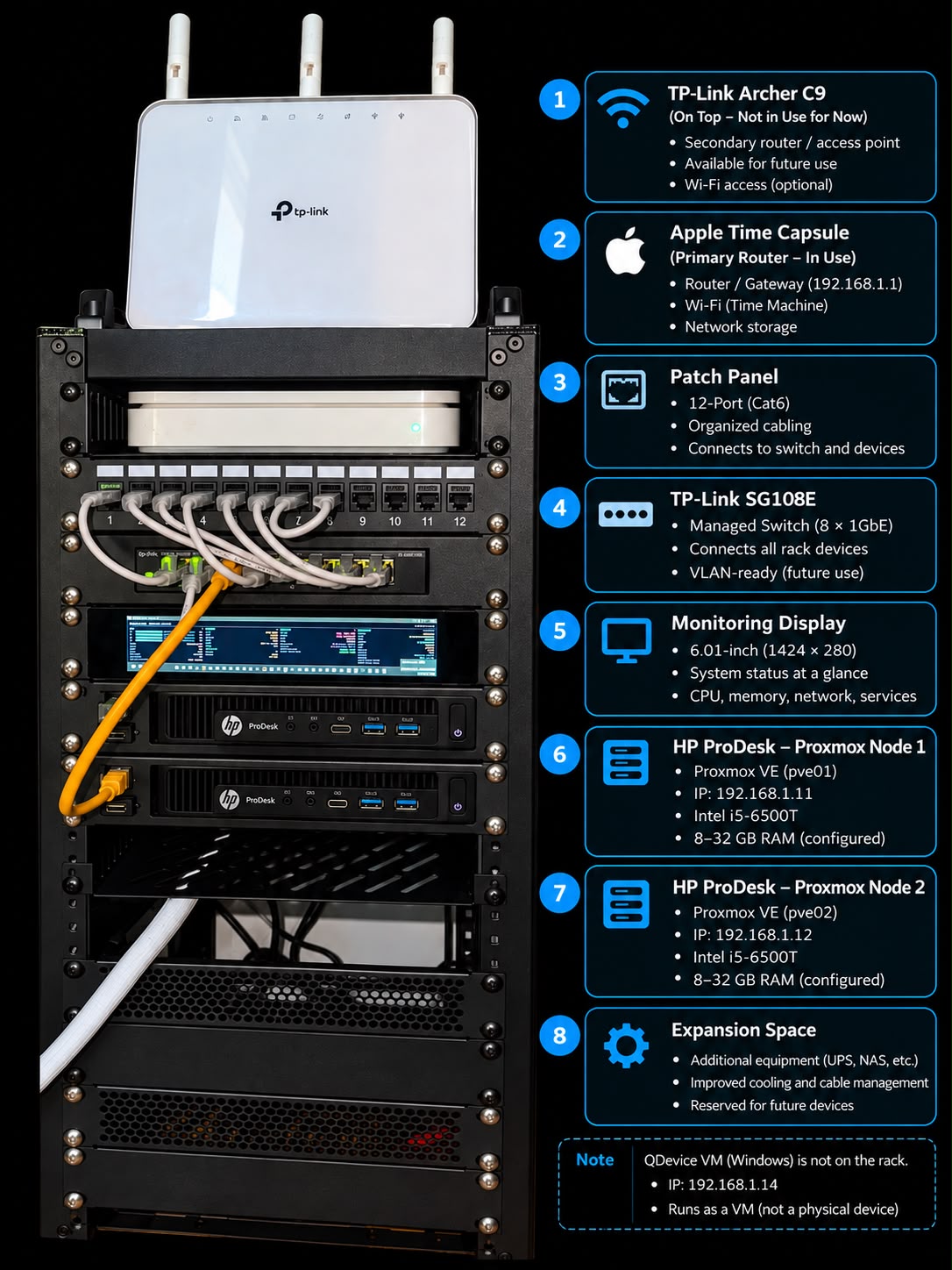
I planned two HP ProDesk Mini nodes as Proxmox VE hypervisors with hardware virtualization (Intel VT‑x/VT‑d) enabled in firmware. Each node was to be upgraded to 32 GB RAM. Hostnames and static management addressing were defined as pve01 (192.x.x.11) and pve02 (192.x.x.12), with matching Proxmox versions and correct DNS.
Role mapping was set: pve01 for network-simulation and Linux services (GNS3 Server, Ubuntu Server, Fedora) and pve02 for the Windows/identity lab (Windows Server, two Windows clients, Ubuntu Desktop). VM primary storage remains local per node. An external 256 GB SSD serves as the portable backup target for VM exports, configuration backups, and selected Proxmox backups.
A Windows Mini PC with 12 GB RAM was reserved to host the Kali workstation (in VirtualBox), the GNS3 client, and a small Linux QDevice VM running corosync‑qnetd at a static address (192.x.x.13) with approximately 512 MB RAM and auto-start behavior.
Architecture
The design centers on a two-node Proxmox VE cluster that uses Corosync for membership and quorum, augmented by a Linux QDevice (corosync-qnetd) on a Windows Mini PC to provide a third vote. This enables correct quorum decisions in a two-node topology without adding a third hypervisor. pve01 is allocated to network simulation and Linux services, including GNS3 Server and general-purpose Linux VMs. pve02 is allocated to a Windows-based identity lab composed of a Windows Server domain controller and two Windows clients, plus an Ubuntu Desktop.
Primary VM disks remain on per-node local storage to keep the footprint simple and inexpensive for a small lab. Backups, configuration exports, and selected Proxmox backups target a portable 256 GB SSD, with explicit separation between transient snapshots and durable backups. The Kali security workstation remains in VirtualBox on the Windows Mini PC to keep intentionally vulnerable activities isolated from the cluster.
Methodology
I sequenced the work to validate hardware first, then build out platform services with clear checkpoints. I started with physical inventory, enabling Intel VT-x/VT-d in firmware, and capturing baseline details with photos for traceability. I planned matched 32 GB RAM per node and a full memory test prior to any hypervisor installation. I then prepared current Proxmox VE media, installed matching versions on both nodes, set unique hostnames, assigned static management IPs outside DHCP (192.x.x.11/.12), and created correct DNS entries, with HP BIOS/device firmware updates before introducing lab workloads.
For storage and protection, I kept per-node local VM storage and designated an external 256 GB SSD for backups and exports, with the practice of disconnecting or protecting it when idle. I planned to form the two-node cluster by creating it on pve01 and joining pve02, then integrating a Linux QDevice VM at 192.x.x.13 to supply a third vote. Validation steps are planned to include Corosync communication checks and time synchronization verification across all participants. No execution or validation results are recorded yet.
Implementation
I organized the implementation as a staged build: confirm and document hardware capabilities and enable virtualization in firmware; upgrade memory to 32 GB per node and complete a full memory test; install Proxmox VE with matching versions, static IPs, and DNS; configure per-node local storage and introduce an external 256 GB SSD as the backup target with clear retention of backups vs. short-lived snapshots; and finally, create the Proxmox cluster on pve01, join pve02, and add a Linux QDevice running corosync-qnetd at 192.x.x.13 on the Windows Mini PC. I assigned workload roles to keep GNS3 and Linux services on pve01 and Windows/identity workloads on pve02, while keeping Kali in VirtualBox on the Windows Mini PC for isolation. The plan includes verifying Corosync membership and time sync after cluster formation. At this stage, all items remain planned with no recorded execution or validation.
Step-by-Step Process
The following step list captures the planned build sequence, success criteria, and rationale for each stage of the lab. It establishes a repeatable path from hardware preparation through clustering and backup setup without asserting execution results.
1. Inventory and prepare both HP ProDesk Mini nodes
Before any software is installed I confirm exactly what the two HP ProDesk Mini computers are and what they can take. For each node I record the precise model, CPU, installed RAM, storage type and capacity, Ethernet controller, BIOS version and the rear ports, and I photograph the model labels and ports for the build record. In BIOS I enable hardware virtualization (Intel VT-x/VT-d) because Proxmox and the nested GNS3 appliances depend on it.
How it was done: Per node, the model, CPU, installed RAM, storage type and capacity, Ethernet controller, BIOS version, and rear ports are to be recorded, with photographs of model labels and ports captured for the build record. In firmware setup, Intel VT-x and VT-d are to be enabled.
Why it was done: Hardware capabilities are to be confirmed and documented before installation, and hardware virtualization (Intel VT-x/VT-d) is to be enabled because Proxmox VE and nested GNS3 appliances depend on it.
What the technology is: Proxmox VE is a Debian-based virtualization platform that uses KVM for virtual machines and LXC for containers. GNS3 is a network simulation/orchestration platform that typically runs QEMU/KVM virtual appliances and Docker containers. Intel VT-x is the CPU hardware virtualization extension used by KVM to accelerate VMs, and Intel VT-d (IOMMU) enables DMA remapping and device passthrough.
How the technology works: KVM relies on Intel VT-x (with EPT) to virtualize privileged CPU operations with minimal overhead. VT-d exposes an IOMMU for PCIe device isolation and passthrough; it is not strictly required for basic VM operation but is required for safe PCI passthrough. Nested virtualization allows a VM to act as a hypervisor; GNS3’s QEMU-based appliances benefit from host VT-x support so that guest hypervisors and nested VMs perform acceptably.
Why this matters: Establishing a precise hardware inventory and enabling VT-x/VT-d up front reduces integration risk, ensures feature compatibility (nested virtualization and potential device passthrough), and supports a matched configuration that simplifies later cluster operations and troubleshooting.
Dependencies: - CPU and chipset must support Intel VT-x (and EPT) for KVM acceleration; firmware must expose and permit enabling it. VT-d support in CPU/chipset/firmware is required only if PCI passthrough or advanced IOMMU isolation is planned. - Physical access to each node is needed to enter firmware setup and to capture photographs of labels and ports. - Accurate identification of NIC model and storage devices is needed for driver compatibility and capacity planning in Proxmox VE. - Consistent firmware configuration across nodes is important for a matched build.
Expected result: Both HP ProDesk Mini nodes documented and confirmed virtualization-capable, ready for a matched build.
Technical significance: This step gates the feasibility of the lab design: without confirmed VT-x (and optionally VT-d), KVM performance and nested virtualization for GNS3 would be constrained or unavailable. A complete, photo-backed inventory creates a reliable baseline for later upgrades, clustering, and incident analysis.
Performance considerations: Enabling VT-x with EPT provides near-native CPU performance for KVM guests; disabling it forces software emulation with severe overhead. Keeping nodes matched in CPU features and memory capacity reduces the chance of migration constraints and uneven performance across the cluster.
2. Upgrade both nodes to 32 GB RAM
Each HP ProDesk node is upgraded to a supported, matched 32 GB configuration and memory-tested before it carries any lab workload. With both nodes at 32 GB the Proxmox cluster provides 64 GB of physical memory. The Windows Mini PC keeps its 12 GB and contributes the Kali workstation, the QDevice and the GNS3 client. The design is sized for a learning lab, so not every VM and GNS3 appliance is expected to run at full load simultaneously.
Both HP ProDesk Mini nodes were planned to be upgraded to a supported, matched 32 GB RAM configuration and to be memory-tested before any lab workload is placed on them.
With both nodes at 32 GB, the Proxmox VE cluster is planned to have 64 GB of physical memory available.
The Windows Mini PC retains its 12 GB and is planned to host the Kali workstation, the QDevice, and the GNS3 client.
The step is currently in planned status; no actual upgrade or testing results are recorded in this step.
How it was done: The configuration calls for matched 32 GB per node and a full memory test to be run after the install of the RAM.
Why it was done: The lab is sized for learning; not every VM or GNS3 appliance is expected to run at full load simultaneously, so upgrading to 32 GB per node aims to provide adequate capacity with headroom.
What the technology is: Upgrading to a matched 32 GB RAM configuration typically means installing identical capacity, speed, and timing modules in both memory channels to maintain dual-channel operation and platform stability.
How the technology works: Memory test utilities (e.g., MemTest86/Memtest86+) boot outside the OS and exercise the full address space with diverse data patterns to detect faults; multiple passes improve confidence that intermittent errors are not present.
Why this matters: Unreliable RAM can produce guest OS crashes, silent data corruption, and unstable hypervisor behavior; validating memory prior to running KVM workloads improves cluster reliability and reduces troubleshooting risk later.
3. Install Proxmox VE on both nodes
I install Proxmox VE on each HP node from a current bootable USB installer, using matching Proxmox versions, unique hostnames pve01 and pve02, static management addresses and correct DNS entries. pve01 becomes the network-simulation and Linux-services node (GNS3 Server, Ubuntu Server, Fedora). pve02 becomes the Windows and identity laboratory (Windows Server, two Windows clients, Ubuntu Desktop). Firmware is updated to current HP BIOS and device firmware before production lab workloads are installed.
Proxmox VE will be installed on two HP ProDesk Mini nodes from a current bootable USB installer, using matching Proxmox versions, with unique hostnames pve01 and pve02, static management addresses outside the DHCP pool, and correct DNS entries.
Firmware on both nodes will be updated to current HP BIOS and device firmware before production lab workloads are installed.
How it was done: Installation is planned from a current bootable USB installer on each node, configuring unique hostnames (pve01, pve02), assigning static management IPs (pve01 = 192.x.x.11, pve02 = 192.x.x.12) outside the DHCP pool, and creating correct DNS entries.
How it was done: Matching Proxmox versions will be used across both nodes to keep them consistent for later clustering.
How it was done: Role intent is defined: pve01 will host network-simulation and Linux services (GNS3 Server, Ubuntu Server, Fedora) and pve02 will host the Windows and identity laboratory (Windows Server, two Windows clients, Ubuntu Desktop).
Why it was done: The expected outcome is two reachable Proxmox nodes with consistent versions, ready to be joined into a cluster.
Why it was done: Matching Proxmox versions, unique hostnames, static management IPs, and correct DNS are foundational prerequisites for reliable cluster formation and management-plane stability in Proxmox VE.
What the technology is: Proxmox VE is a Debian-based, type-1 virtualization platform that provides KVM/QEMU virtual machines and LXC containers with a web-based management interface, clustering via Corosync, and integrated backup/restore features.
How the technology works: In a Proxmox VE cluster, each node’s identity is established by its hostname and stable management address; Corosync uses these for membership and quorum. Version parity across nodes reduces API/schema mismatches and ensures consistent kernel and cluster stack behavior.
4. Configure local storage and the external backup target
Each node keeps local VM storage rather than primary shared storage, which suits a small two-node lab. The external 256 GB SSD is the portable backup target for VM exports, configuration backups and selected Proxmox backups. Snapshots are used before risky changes, but backups are the mechanism for long-term recovery: a snapshot lives on the same disks as the VM and is not a backup.
Why it was done: Local VM storage per node was chosen instead of primary shared storage to suit a small two-node lab.
Why it was done: A 256 GB external SSD was designated as a portable backup target for VM exports, configuration backups, and selected Proxmox backups.
Why it was done: Snapshots were reserved for short-term protection before risky changes, and backups were defined as the mechanism for long-term recovery because snapshots reside on the same disks as the VM.
What the technology is: Proxmox VE supports multiple storage backends: local LVM-Thin or ZFS are commonly used for VM/CT disks, and a Directory storage is commonly used for backups, templates, and ISO images.
How the technology works: Proxmox VM/CT backups (vzdump) create archive files to a storage marked for backup content; jobs support modes (snapshot/suspend/stop), compression (e.g., zstd), verification, and retention pruning.
How the technology works: VM snapshots rely on copy-on-write on the same datastore (e.g., LVM-Thin or ZFS). They do not protect against datastore loss or corruption and can add write amplification and space consumption while they exist.
Dependencies: Both Proxmox nodes need to be installed and reachable with administrative access; the external SSD must be recognized by Linux, formatted with a supported filesystem (e.g., ext4 or xfs), and mounted at a stable path before adding it as Proxmox Directory storage.
Dependencies: Stable device identification (UUID or PARTUUID via fstab or a systemd mount unit) and sufficient capacity on the SSD are prerequisites; time synchronization is required for scheduled backup jobs.
Expected result: Every node can run VMs locally and export backups to the external SSD; snapshot and backup roles remain distinct.
5. Create the two-node cluster and add a Linux QDevice for quorum
A two-node Proxmox cluster can lose quorum when one node is unavailable, so a third vote is required. I create the cluster on pve01, join pve02, and validate corosync communication and time synchronization. A small, lightweight Linux QDevice VM on the Windows Mini PC runs corosync-qnetd and supplies the third quorum vote. It carries no workloads and provides no shared storage; it just needs a stable address and to be available when the cluster needs its vote. The QDevice improves voting decisions but does not by itself make the cluster highly available - automatic VM recovery would also need suitable storage, a tested HA configuration and enough capacity on the surviving node.
A two-node Proxmox VE cluster was planned: the cluster would be created on pve01, pve02 would be joined, and a lightweight Linux QDevice VM running corosync-qnetd on the Windows Mini PC would supply a third quorum vote. The QDevice VM was specified to have approximately 512 MB RAM, a static address at 192.x.x.13, auto-start with the Windows host, and to carry no workloads or shared storage. Corosync communication and time synchronization were to be validated.
How it was done: The intended procedure was to initialize the cluster on pve01, join pve02 to the cluster, validate Corosync ring communication and clock synchronization between nodes, and configure the cluster to use the Linux QDevice by pointing it at the corosync-qnetd service hosted on 192.x.x.13.
Why it was done: A two-node cluster can lose quorum when one node is unavailable, so a third vote is required to maintain quorum. The Linux QDevice supplies the third quorum vote to improve voting decisions. This does not by itself provide high availability; automatic VM recovery would also require suitable shared storage, a tested HA configuration, and enough capacity on the surviving node.
What the technology is: Proxmox VE clustering relies on Corosync for membership and quorum. In a two-node topology, a QDevice (quorum device) acts as an external arbitrator to provide an additional vote. The QDevice architecture consists of corosync-qnetd (the arbitrator service running on the external host/VM) and corosync-qdevice (the agent on each cluster node that communicates with qnetd). This arrangement lets a two-node cluster achieve an odd number of votes without adding a full third hypervisor node.
How the technology works: Corosync forms a membership ring and assigns votes to calculate quorum. With two nodes plus a QDevice, the cluster has three total votes; quorum requires a majority (2/3). If one node fails but both surviving endpoints (the remaining node and the QDevice) can still communicate, the cluster remains quorate. In a partition, the side that retains connectivity to qnetd and at least one node retains quorum. Time synchronization is important because Corosync’s token and membership algorithms assume stable clocks; poor time sync can cause spurious membership changes.
Dependencies: The QDevice VM was specified to run corosync-qnetd with approximately 512 MB RAM, use a static IP address at 192.x.x.13, auto-start when the Windows Mini PC boots, and remain available when the cluster needs its vote. It was explicitly scoped to provide quorum only (no workloads or shared storage).
Dependencies: Prerequisites include: both Proxmox nodes installed and reachable; stable network connectivity among pve01, pve02, and the QDevice host; consistent time synchronization on all three systems; static addressing and working name resolution for the Corosync ring and the QDevice endpoint; and firewall allowances for Corosync and qnetd traffic in the chosen transport/ports used by the environment.
Expected result: The cluster should report three quorum votes and remain quorate when either node is taken offline.
Technical significance: Adding a QDevice to a two-node Proxmox VE cluster enables correct quorum decisions with minimal additional infrastructure, reducing the risk of split-brain or write suspension when one node is offline. It decouples quorum from storage and compute design, allowing the lab to practice clustering semantics before introducing and validating full HA with shared storage.
6. Design the network and VLANs on the TP-Link SG108E
The home router, the Windows Mini PC and both Proxmox nodes connect to the TP-Link TL-SG108E managed switch, with the patch panel used for clean cabling. Initially the Proxmox management interface and cluster traffic can share one physical NIC because the lab is small and the switch is reliable; a second USB or internal Ethernet adapter can later separate management, storage or simulated external networks. VLANs segment the lab: Management (10), Server lab (20), Windows lab (30), Security lab (40) and GNS3 transit (50). The identifiers and subnets are examples to confirm against the home router network and switch capabilities before applying.
A lab network and VLAN segmentation plan was drafted for the TP-Link TL-SG108E. The home router, the Windows Mini PC, and both Proxmox nodes are planned to connect to this switch, with the patch panel used for clean cabling. VLANs are defined as: 10 (Management), 20 (Server lab), 30 (Windows lab), 40 (Security lab), and 50 (GNS3 transit), each with an example /24 subnet. The Proxmox management interface and cluster traffic are planned to share one physical NIC initially, with an option to add a second USB or internal NIC later to separate management, storage, or simulated external networks. The identifiers and subnets are examples to be confirmed against the home router and switch capabilities before applying.
How it was done: The segmentation approach assigns VLAN IDs and example subnets as follows: VLAN 10 Management 192.x.x.0/24 (Proxmox web/SSH, switch management); VLAN 20 Server lab 192.x.x.0/24 (Linux servers, trusted services); VLAN 30 Windows lab 192.x.x.0/24 (Windows Server and domain clients); VLAN 40 Security lab 192.x.x.0/24 (Kali and intentionally vulnerable targets); VLAN 50 GNS3 transit 192.x.x.0/24 (links between GNS3 and selected systems). Initially, one physical NIC per Proxmox node carries management and cluster traffic, with later expansion to a second NIC for separation as needed.
Why it was done: The design aims to isolate vulnerable test systems from the normal home LAN and from the management network while supporting a small lab footprint that initially shares Proxmox management and cluster traffic on one NIC.
What the technology is: IEEE 802.1Q VLANs logically partition a single Layer 2 switch into multiple broadcast domains, allowing distinct security and routing policies per segment. A managed ("smart") switch with 802.1Q support can tag traffic on trunk ports and map untagged traffic on access ports to a specific VLAN via PVID. A GNS3 transit VLAN provides an L2 path for traffic between virtual network devices and selected physical or virtual endpoints.
How the technology works: Access ports present a single untagged VLAN to attached devices (assigned via PVID). Trunk ports carry multiple VLANs using 802.1Q tags. Endpoints that understand tagging (e.g., hypervisors) can place frames into specific VLANs via tagged subinterfaces or VLAN-aware bridges. Proxmox uses Linux bridges; enabling VLAN awareness on a bridge allows VMs to attach to tagged VLANs using vNIC settings. Inter-VLAN routing, if required, is provided by a router or L3 firewall using subinterfaces (router-on-a-stick) or SVI equivalents. The switch management interface can be bound to a dedicated management VLAN to reduce exposure.
Dependencies: Functional prerequisites include: a switch that supports 802.1Q VLAN tagging and per-port PVID assignment; Proxmox bridges configured as VLAN-aware (or explicit tagged subinterfaces) to carry multiple lab VLANs on a single NIC/trunk; NICs and drivers that reliably handle VLAN-tagged frames (especially for any USB NICs added later); an L3 device (home router or dedicated firewall) capable of handling multiple VLAN interfaces if inter-VLAN routing or external connectivity for specific VLANs is needed; and a clear port/VLAN map aligning physical switch ports, patch panel terminations, and host NICs.
Expected result: A segmented lab network where vulnerable test systems are isolated from the normal home LAN and from the management network.
Technical significance: Segmentation reduces broadcast scope and constrains the blast radius of misconfigurations or compromises in intentionally vulnerable environments. A dedicated transit VLAN for GNS3 enables controlled injection and capture of lab traffic without exposing it to other segments. The plan also aligns with hypervisor networking patterns (VLAN-aware bridges) for efficient use of limited physical NICs.
7. Deploy the GNS3 server on pve01 and connect the Windows GNS3 client
The GNS3 graphical client runs on the Windows machine and is configured to use the remote GNS3 server VM on pve01. The server VM performs the heavy appliance emulation (Cisco, firewall and network-appliance simulation) while the Windows application provides the topology editor. Nested virtualization must be enabled on pve01 for KVM-based GNS3 appliances. GNS3 does not include Cisco IOS/IOSv or other commercial appliance images; I use only images I have valid rights and licenses for.
A GNS3 server VM is to be deployed on pve01 and the Windows GNS3 client is to be configured to use this remote server; the server VM will perform the heavy appliance emulation while the Windows application provides the topology editor.
The planned GNS3 server VM specification is Ubuntu Server 24.04 LTS with 4 vCPUs (to be increased only after monitoring), 12 GB RAM, 80 GB thin‑provisioned storage, a primary VirtIO adapter on the management/server network, a second VirtIO adapter on a dedicated bridge or VLAN trunk, and nested KVM enabled.
Why it was done: Nested virtualization on pve01 must be enabled to run KVM‑based GNS3 appliances, and only images with valid rights and licenses will be used.
What the technology is: GNS3 is a client–server network simulation/orchestration platform: the GUI runs on a workstation and delegates creation and runtime of virtual network nodes and links to a remote server via an API.
How the technology works: On Linux, the GNS3 server uses QEMU/KVM for general network OS images and can integrate other backends (e.g., Dynamips, Docker). Interfaces are attached to Linux bridges/taps to form topologies. Nested virtualization exposes VMX/SVM CPU features to a VM so QEMU can use hardware acceleration inside the VM, which is required for KVM‑based appliances.
Dependencies: pve01 must provide nested KVM and appropriate Proxmox bridges/VLAN trunking so the GNS3 VM can place one NIC on the management/server network and another on a dedicated bridge or VLAN trunk.
Dependencies: A Windows machine running the GNS3 graphical client with connectivity to the GNS3 server VM is assumed.
8. Build the Windows and Active Directory laboratory on pve02
pve02 hosts the identity laboratory: a Windows Server providing Active Directory, DNS and infrastructure services; two Windows client VMs joined to the domain for security and policy testing; and an Ubuntu Desktop as a Linux administrative workstation. This is where I practice domain administration, Group Policy, and identity/security testing against a realistic Windows environment.
A Windows and Active Directory laboratory is planned to be built on pve02 consisting of: a Windows Server VM (8 GB RAM) providing AD DS, DNS, and infrastructure services; two Windows client VMs (6 GB RAM each) to be joined to the domain for security and policy testing; and an Ubuntu Desktop VM (4 GB RAM) as a Linux administrative workstation. Approximately 24 GB of RAM on pve02 is planned for this lab.
Why it was done: The laboratory is intended for practicing domain administration, Group Policy, and identity/security testing in a realistic Windows environment.
What the technology is: Active Directory Domain Services (AD DS) is Microsoft’s directory service providing centralized authentication/authorization (Kerberos/NTLM), directory queries (LDAP), integrated DNS for service discovery (SRV records), and Group Policy for configuration enforcement across domain-joined Windows systems.
How the technology works: AD DS relies on DNS SRV records to let clients locate domain controllers. A computer join creates a secure channel and a computer object in the directory. Authentication is typically via Kerberos within the time-skew tolerance, so clients must have accurate time relative to the domain controller. Group Policy Objects are processed at computer startup/logon and then periodically, applying settings based on site/domain/OU scope and link order.
Dependencies: pve02 capacity planning allocates ~24 GB RAM to these VMs; this consumption on pve02 is an explicit constraint for the build.
Dependencies: Key prerequisites typically include: installation media and licensing for Windows Server and Windows clients; sufficient CPU, RAM, and storage on pve02; an isolated or controllable virtual network (e.g., dedicated Proxmox bridge/VLAN) for the lab; a static IP and hostname plan for the domain controller; accurate time synchronization for Kerberos (NTP); and a decision on DHCP location (domain controller vs. upstream lab router). For optimal performance on Proxmox, paravirtualized VirtIO drivers and the QEMU guest agent are generally required for Windows guests.
Expected result: A working Active Directory domain with two joined Windows clients and a Linux administrative workstation, ready for identity and policy exercises.
9. Keep the Kali workstation in VirtualBox on the Windows Mini PC
Kali Linux stays on the Windows Mini PC in VirtualBox rather than moving to Proxmox. This separates the testing workstation from the target VMs hosted by Proxmox; avoids consuming Proxmox memory that is better reserved for the GNS3 and Active Directory laboratories; simplifies USB passthrough for a compatible Wi-Fi adapter used in an authorized wireless lab; and preserves the existing VirtualBox workflow while the two Proxmox nodes are installed and stabilized. The Windows host has 12 GB RAM, so I allocate about 4 GB to Kali and 512 MB to the QDevice and avoid running several other VirtualBox VMs at once, keeping the QDevice available for the cluster's third vote.
Kali Linux was planned to remain on the Windows Mini PC under VirtualBox instead of being migrated to Proxmox. The Windows host has 12 GB of RAM; approximately 4 GB was allocated to the Kali VM and 512 MB to a lightweight QDevice VM, with an explicit intent to avoid running several other VirtualBox VMs concurrently so the QDevice remains available. USB passthrough was planned for a compatible Wi‑Fi adapter used only for authorized wireless testing.
How it was done: The configuration plan specifies a Kali VirtualBox VM with 4 GB RAM and a QDevice VM with 512 MB RAM on the 12 GB Windows Mini PC, plus VirtualBox USB device passthrough to Kali for the Wi‑Fi adapter. Operational discipline was defined to avoid starting multiple additional VirtualBox VMs simultaneously to prevent contention that could impact the QDevice.
Why it was done: Keeping Kali on VirtualBox separates the testing workstation from Proxmox‑hosted target VMs, preserves Proxmox memory for the GNS3 and Active Directory labs, simplifies USB Wi‑Fi passthrough for the wireless lab, and preserves the established VirtualBox workflow while the two Proxmox nodes are installed and stabilized.
What the technology is: Proxmox VE is a type‑1 hypervisor platform that clusters via Corosync for membership and quorum. In two‑node clusters, a Corosync QDevice adds an external vote (via a qnetd service) to avoid split‑brain. Oracle VM VirtualBox is a type‑2 hypervisor running atop Windows, supporting features such as headless VMs and USB passthrough. USB passthrough attaches host USB devices directly to a guest for driver‑level access in the VM.
How the technology works: Corosync requires a majority of votes to form quorum; with two nodes, an external arbitrator (QDevice via qnetd) provides a third vote so one node can continue safely if the other fails. The qnetd service runs on an independent system reachable by both nodes; the corosync‑qdevice client on each node exchanges signed vote messages with qnetd. VirtualBox USB passthrough uses a kernel driver and, with the Extension Pack, supports USB 2.0/3.x to detach a host device and present it to a guest controller; device filters can auto‑attach a specific adapter to the Kali VM.
Dependencies: - Windows Mini PC with 12 GB RAM hosting VirtualBox. - VirtualBox VMs: Kali (4 GB) and QDevice (512 MB). - Operational constraint to avoid running several other VirtualBox VMs so the QDevice remains available.
Dependencies: - VirtualBox Extension Pack for reliable USB 2.0/3.x passthrough. - A Wi‑Fi adapter chipset supported by Kali Linux drivers. - Network reachability between the QDevice/qnetd VM and both Proxmox nodes, including stable IP, DNS (or static addressing), and synchronized time (NTP). - Corosync configured on the Proxmox nodes with qdevice integration to the external qnetd. - Adequate host headroom for Windows and background processes while both VMs run.
Expected result: Kali runs isolated from Proxmox targets with a working USB Wi‑Fi path, without starving the Windows host or the QDevice VM.
Actual result: The step is in planned status; no execution or validation results were recorded.
10. Migrate remaining VMs from VirtualBox to Proxmox
I preserve the existing VirtualBox VMs until the imported copies are tested, moving one VM at a time and starting with a noncritical Linux VM. For each: shut down the source cleanly and take a verified backup or clone; record CPU count, RAM, disk layout, firmware mode, network settings and snapshots; export as OVF or copy the virtual disk, converting VDI/VMDK to a Proxmox-compatible format when required; create a matching Proxmox VM with the correct BIOS/UEFI mode and import the disk; install VirtIO drivers before switching Windows devices to VirtIO; boot on an isolated bridge and verify services, networking, activation and application data; then take a Proxmox backup and retain the VirtualBox original until the new VM passes normal use testing. Kali is the exception and stays in VirtualBox as planned.
A migration plan was established to move the remaining VirtualBox VMs to Proxmox VE one VM at a time, preserving the VirtualBox originals until each imported copy is validated; Kali remains in VirtualBox by design.
How it was done: For each VM: the source is shut down cleanly and a verified backup or clone is taken; CPU count, RAM, disk layout, firmware mode, network settings, and snapshots are recorded; the VM is exported as OVF or its virtual disk is copied, converting VDI/VMDK to a Proxmox-compatible format as required; a matching Proxmox VM is created with the correct BIOS/UEFI mode and the disk is imported; for Windows guests, VirtIO drivers are installed before switching disk and network devices to VirtIO; the VM is first booted on an isolated bridge and services, networking, activation, and application data are verified; a Proxmox backup is then taken and the VirtualBox original is retained until the new VM passes normal-use testing.
What the technology is: Proxmox VE is a KVM/QEMU-based virtualization platform; VirtualBox is a type-2 hypervisor. OVF is an open packaging format for virtual appliances. VirtIO provides paravirtualized drivers for disk and network to improve performance and efficiency on KVM-based hypervisors.
How the technology works: An OVF export packages VM metadata and disks for import into another hypervisor; alternatively, a virtual disk can be copied and converted (e.g., to qcow2 or raw) and attached to a newly created VM. Boot firmware (BIOS vs UEFI) must match to preserve bootability. VirtIO drivers must be present in the guest OS before switching the controller types to avoid boot or network loss. Testing on an isolated bridge prevents address or service collisions while the new instance is validated.
Expected result: Each migrated workload runs correctly on its assigned Proxmox node, validated before the original is retired.
Actual result: No execution or validation results are recorded for this step; it is currently planned.
Technical significance: Matching firmware (BIOS/UEFI) and controller types preserves bootability. Pre-installing VirtIO in Windows avoids boot-time driver gaps and enables materially better I/O performance on KVM. Isolated-first boot avoids duplicate addressing and service announcements that can corrupt state (e.g., DHCP, DNS, AD) during migration testing.
11. Test recovery and establish operating guidance
Once the cluster and workloads are in place I restore at least one VM from backup, simulate one node being offline, and document the expected quorum and service behavior. Ongoing operations follow a simple routine: schedule Proxmox backups, rotate copies and periodically test a restore; patch the two hosts one at a time, confirming quorum and backups before each maintenance window; track host memory, CPU temperature, storage health, backup status and switch port errors; add a UPS when possible with graceful shutdown for the nodes and network equipment; use unique administrator credentials, SSH keys where possible and multifactor authentication for the Proxmox interface; and maintain an IP address list, VLAN map, VM inventory and recovery notes as the lab changes.
The recovery drill and operating guidance were defined but not yet executed. The drill specifies restoring at least one VM from backup, simulating one node being offline, and documenting expected quorum and service behavior. Ongoing operations are defined to include: scheduled Proxmox backups with rotation and periodic restore testing; patching one host at a time with quorum and backup checks before each maintenance window; monitoring of host memory utilization, CPU temperature, storage health, backup status, and switch port errors; adding a UPS with graceful shutdown for the nodes and network equipment; hardening access with unique administrator credentials, SSH keys where possible, and multifactor authentication on the Proxmox interface; and maintaining an IP address list, VLAN map, VM inventory, and recovery notes as the lab evolves.
How it was done: The step is planned to run once the cluster and workloads are in place. The configuration for the drill is to restore one VM from backup and take one node offline, then document cluster quorum and service behavior. The operating routine is outlined to cover backup rotation with restore testing, single-node patching, targeted health monitoring, UPS integration for graceful shutdown, access hardening, and living documentation.
Why it was done: The testing and guidance are being established to verify recovery capability, to document expected quorum and service behavior during a node outage, and to create a repeatable operating routine that keeps the lab reliable as it grows.
What the technology is: Proxmox VE provides clustering, high availability (HA), and backup/restore for virtual machines and containers. Cluster membership and quorum are coordinated by Corosync; in two-node topologies a QDevice (quorum device) is commonly used as a tie-breaker to avoid split-brain. Proxmox backups (e.g., vzdump to storage or Proxmox Backup Server) support full and incremental images and VM-consistent snapshots where applicable.
How the technology works: Corosync computes quorum from the set of voting members; with two nodes, a QDevice adds an external vote to allow one node to continue providing services if the peer is offline. When one node is taken offline in a properly configured two-node-plus-qdevice cluster, the remaining online node retains quorum and HA-managed services continue running, while fenced or failed services on the offline node are not available until recovery. A restore test exercises the backup chain and storage path, validating that a VM image can be instantiated and its services brought up. Patching one node at a time preserves quorum and service availability if HA is configured. A UPS, integrated via NUT or apcupsd, can signal low-battery events to orchestrate orderly shutdown of hypervisors and network devices to prevent data corruption.
Why this matters: Practicing restores and controlled failure scenarios validates that data protection, quorum, and HA operate as intended, reducing the risk of data loss and downtime. A documented, repeatable operating routine (backups, patching, monitoring, access controls) establishes a baseline of reliability and security as the environment scales.
Dependencies: This step is planned to occur once the cluster and workloads are in place.
Dependencies: A functional backup target with at least one recent, valid backup is required to perform a restore drill safely, ideally to non-production storage or an isolated VLAN to avoid duplicate IP/MAC conflicts.
Dependencies: Monitoring of switch port errors requires a managed switch that exposes per-port error counters (e.g., via its UI, SNMP, or streaming telemetry) and network access to query those counters.
Dependencies: Graceful shutdown on power loss requires a UPS compatible with NUT or apcupsd, cabled to at least one node or a network UPS card, and appropriate agents configured on the Proxmox hosts and any critical network gear.
Lessons Learned
Upfront hardware validation matters: confirming VT-x/VT-d in firmware and documenting precise hardware details before installation reduces integration risk and accelerates troubleshooting later. Memory reliability is foundational; running a full memory test after upgrading to 32 GB per node helps prevent nondeterministic failures under KVM workloads.
Cluster hygiene begins with identity and parity: unique, DNS-resolved hostnames and static management IPs, combined with matching Proxmox versions, are prerequisites for a clean cluster join and predictable operations. In a two-node topology, a QDevice is the right tool to achieve an odd number of votes; it improves quorum decisions but does not deliver HA by itself.
Protection strategy must distinguish snapshots from backups. Snapshots are co-resident with the VM and are best used as short-lived safety nets before risky changes. Durable recovery depends on backups to a separate medium; keeping a portable SSD disconnected or otherwise protected when idle reduces exposure.
Recommendations
Conclusion
This work delivers a detailed, staged plan for a small, resilient Proxmox VE homelab with quorum via a Linux QDevice, clear workload roles, and a backup-first protection model using a portable SSD. It establishes the prerequisites and configuration needed for a clean cluster build and clarifies that snapshots and quorum alone do not provide HA. As recorded here, all items remain in planned status with no installations, tests, or results captured yet; the design is ready for execution and subsequent validation.
Appendix
Evidence catalogue
| Title | Kind | Review state | Appears in |
|---|---|---|---|
| rack-photo | photo | ai-analyzed | Environment |
Extracted text
Extract — rack-photo
9 10 11 12

tp-link

Holmes